Imagine never having to guess if your mower’s battery is charged or about to die. What if you could check its status anytime, anywhere, without even stepping outside?
If you’ve ever been caught off guard by a dead mower battery, you know how frustrating it can be. You’ll discover simple and effective ways to monitor your mower battery remotely. Stay ahead of problems, save time, and keep your mower ready whenever you need it.
Ready to take control of your mower’s power? Let’s dive in.

Credit: produxhub.com
Choosing The Right Battery Monitor
Battery monitorscome in various types to suit different needs. Some use Bluetoothto connect to your phone. Others rely on wifito send updates remotely. There are also simple voltage metersthat show battery status at a glance.
Check the compatibilityof the monitor with your mower battery type. Most lawn mowers use 12V lead-acidor lithium-ionbatteries. Make sure the monitor supports the right voltage and chemistry.
| Key Features | Why It Matters |
|---|---|
| Real-time Monitoring | See battery status instantly on your phone |
| Alerts and Notifications | Get warnings about low battery or faults |
| Easy Installation | Quick setup without special tools |
| Battery Health Tracking | Know when to replace or recharge |

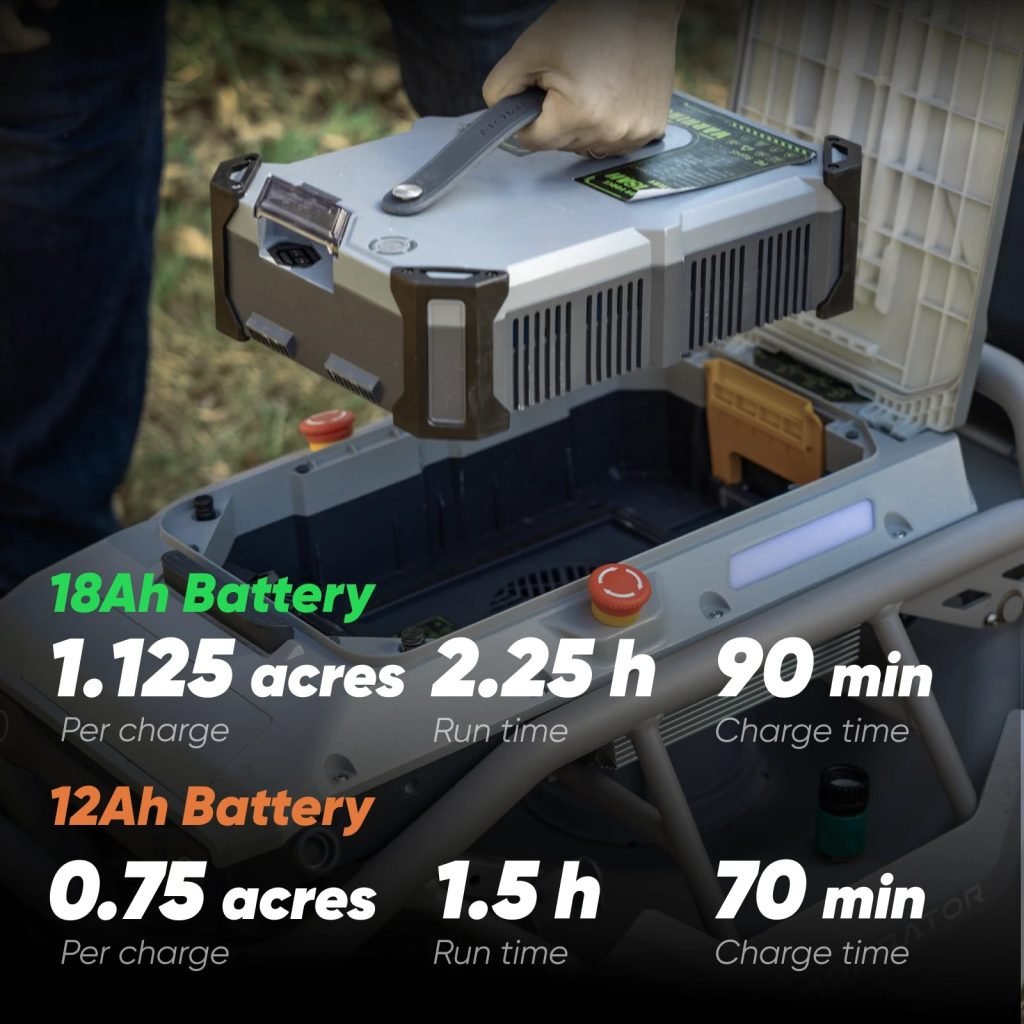
Credit: mowrator.com
Setting Up Remote Monitoring
Attach the monitor securely to your mower’s battery. Use screws or strong tape to keep it steady. Check the monitor fits well and does not block any parts. Make sure the wires connect properly to the battery terminals. Double-check all connections to avoid loose ends.
Choose Wi-Fi or Bluetooth based on your mower’s location. Wi-Fi works well if the mower is near the house. Bluetooth suits short distances, like in your yard. Follow the device instructions to connect the monitor to your chosen network. Enter the correct password if needed to link the device.
- Download the app on your phone or tablet.
- Open the app and create an account.
- Follow prompts to add your mower’s monitor.
- Check battery status and alerts anytime.
- Set up notifications for low battery or issues.
Interpreting Battery Data
Voltageshows how much power is in the battery. It’s like checking how full a glass of water is. When the voltage is high, the battery is full. Low voltage means the battery needs charging. Always check your battery’s voltage regularly.
Temperatureaffects the battery’s life. Hot temperatures can damage it. Always keep your battery cool and safe. Check the battery’s health indicators often. This helps in knowing if it is healthy or not. Healthy batteries last longer.
- Alertstell you when the battery is low.
- Notifications remind you to charge the battery.
- Set up alerts on your phone or computer.
- Stay informed and keep your battery in good shape.

Credit: www.youtube.com
Troubleshooting Common Issues
Connectivity problemsoften cause remote monitoring issues. Check if the mower is within the device’s range. Restart the mower and the monitoring app to refresh the connection. Ensure the Wi-Fi or Bluetooth signal is strong enough. Sometimes, updating the app or device firmware fixes connection bugs.
Inaccurate readingscan happen due to sensor errors or software glitches. Calibrate the battery sensor regularly to keep data accurate. Clear app cache or reinstall the app if numbers look wrong. Avoid interference from other electronic devices near the mower.
Battery performance dropssignal a possible battery health problem. Check the battery for wear or damage. Clean the battery contacts and ensure proper charging habits. Replace the battery if it no longer holds a charge well.
Maintenance Tips For Battery Longevity
Keeping a mower battery healthy needs good charging habits. Charge the battery fully before using it. Avoid leaving it plugged in for too long to prevent overcharging. Charge the battery after each use, even if it’s not empty. This helps keep the battery strong.
Storing the battery properly is key. Store it in a cool, dry placeto avoid damage. Remove the battery from the mower during winter or long storage times. Keep the battery away from direct sunlight and heat sources.
Cleaning and checking the battery often helps find problems early. Use a dry cloth to wipe dirt and dust off the battery. Check the battery terminals for any corrosion or rust. If you see corrosion, clean it carefully with a mix of baking soda and water. Make sure connections are tight and clean.
Frequently Asked Questions
How Can I Check Mower Battery Status Remotely?
You can monitor your mower battery remotely using smart battery monitors or IoT-enabled devices. These connect via Bluetooth or Wi-Fi to an app that shows real-time battery health and charge levels.
What Devices Work For Remote Mower Battery Monitoring?
Smart battery monitors, Bluetooth sensors, and IoT trackers are suitable. They attach to the battery and send data to your smartphone or computer for easy access.
Is Remote Monitoring Useful For Mower Battery Maintenance?
Yes, it helps prevent unexpected battery failure by providing timely alerts. This ensures you recharge or service the battery before it completely drains.
Can I Get Alerts For Low Mower Battery Remotely?
Most smart battery monitors offer customizable alerts. They notify you via app notifications or emails when the battery charge drops below a set threshold.
Conclusion
Monitoring your mower battery remotely saves time and effort. You can check battery status from anywhere. This helps avoid unexpected power loss during mowing. Simple tools and apps make remote monitoring easy. Regular checks keep your mower ready to use.
Stay informed and prevent battery problems early. Keep your mower running smoothly all season. Remote monitoring brings peace of mind and convenience. Start using these tips to protect your mower battery today.