Have you ever found yourself frustrated with a dull pencil sharpener that just won’t get the job done? You’re not alone.
Whether you’re an artist, a student, or someone who simply loves the feel of a freshly sharpened pencil, knowing how to remove a blade from a pencil sharpener can be a game-changer. Imagine the satisfaction of restoring your sharpener to its original efficiency.
By learning this simple skill, you can save money, avoid the hassle of frequent replacements, and keep your creative or work flow uninterrupted. Stay with us, and discover how you can take control of your pencil sharpening experience with just a few easy steps. Your pencils, and your productivity, will thank you.
Types Of Pencil Sharpeners
Pencil sharpeners come in various types, each designed for specific needs. Knowing the type helps when removing or replacing the blade. Two main types are manual and electric sharpeners. Both have different designs and blade setups.
Manual Sharpeners
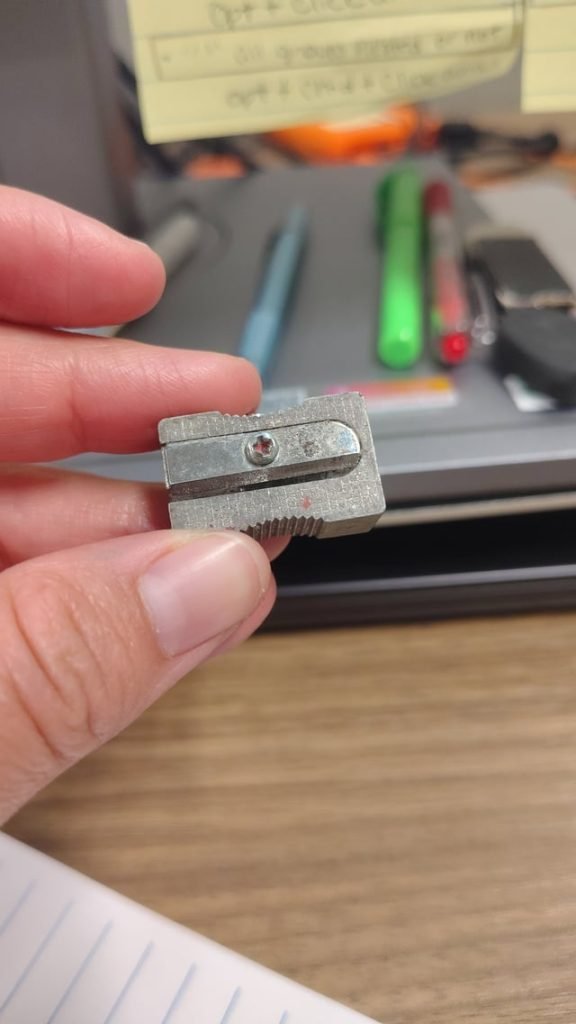
Manual sharpeners are simple and portable. They usually have a small metal blade fixed inside a plastic or metal case. The blade is easy to access by opening the sharpener. You can remove the blade with a screwdriver. These sharpeners require hand turning to sharpen pencils. They are quiet and do not need batteries.
Electric Sharpeners
Electric sharpeners have a motor that spins the blade. The blade is often inside a larger, enclosed unit. Removing the blade needs more care and sometimes special tools. Electric sharpeners sharpen pencils quickly and evenly. They often have safety features to stop the blade when the cover is open.

Credit: www.reddit.com
Tools Needed For Blade Removal
Removing a blade from a pencil sharpener requires the right set of tools to make the process safe and efficient. Having these tools at hand not only speeds up your task but also helps avoid damage to the sharpener or yourself. Let’s look at the essential tools you’ll need before you start unscrewing.
Screwdrivers
Screwdrivers are the primary tools for loosening and removing the screws that hold the blade in place. Most pencil sharpeners use small Phillips or flathead screws, so having a set with various sizes is helpful. Using the correct screwdriver size prevents stripping the screws, which can make blade removal frustrating and difficult.
Protective Gloves
Sharp blades can easily cause cuts if you’re not careful. Wearing protective gloves shields your hands while you handle the blade. It’s a simple safety step that many overlook but can save you from painful injuries.
Cleaning Supplies
Once the blade is removed, you’ll often find pencil shavings and graphite dust inside the sharpener. Having cleaning supplies like a small brush, cloth, or compressed air can help clear out debris. Cleaning the area ensures the sharpener works smoothly when you put the blade back or replace it with a new one.
Preparing The Sharpener
Before you start removing the blade from your pencil sharpener, getting the device ready is crucial. Proper preparation not only keeps you safe but also makes the task easier and cleaner. Taking a few simple steps can save you frustration and prevent damage to your sharpener.
Unplugging Electric Models
If your sharpener is electric, the first thing you need to do is unplug it. This step might seem obvious, but skipping it can lead to accidental injuries or damage to the appliance.
Unplugging cuts off all power, ensuring the blade won’t move while you’re handling it. I once ignored this and got a nasty pinch—trust me, it’s not worth the risk. Always double-check that the cord is disconnected before proceeding.
Emptying Shavings
Empty out all the pencil shavings from the sharpener’s container. A full or partially full compartment can obstruct your access to the blade and make the process messy.
Carefully remove the shavings by tipping the container into a trash bin or using a small brush to clear out residual bits. Keeping the working area clean helps you see what you’re doing and prevents shavings from flying around as you work.
Removing The Blade
Removing the blade from a pencil sharpener requires care and attention. The blade is usually held in place by screws. Taking it out allows for cleaning, replacement, or repairs. Follow simple steps for safe removal.
Locating The Screws
First, find the screws holding the blade. Most pencil sharpeners have screws on the back or inside the casing. Use a flashlight if needed to see clearly. Screws can be small and sometimes hidden under stickers or plastic covers.
Unscrewing The Blade
Use a suitable screwdriver to loosen the screws. Turn the screwdriver counterclockwise to remove each screw. Keep the screws in a safe place to avoid losing them. Remove the blade carefully once the screws are out.
Handling The Blade Safely
The blade is sharp and can cause cuts. Hold it by the edges, not the sharp side. Place the blade on a flat surface or in a container. Wear gloves if possible for extra protection. Always keep blades away from children and pets.
Cleaning The Sharpener
Cleaning the sharpener keeps it working smoothly and extends its life. Dirt, pencil shavings, and residue can block the blade. Regular cleaning prevents jams and dullness. Use simple tools and gentle care to clean the parts safely.
Removing Residue
Remove loose shavings by gently tapping the sharpener over a trash bin. Use a soft brush or a cotton swab to clear small particles around the blade. Avoid using water directly on the blade. A dry cloth can wipe away dust and graphite residue. Cleaning often stops buildup that dulls the blade.
Checking For Damage
Inspect the blade closely for rust, nicks, or bends. A damaged blade cuts unevenly and can break pencils. Look at the housing for cracks or loose screws. Tighten any loose parts carefully. Replace the blade if you find any damage to keep the sharpener safe and effective.

Credit: www.amazon.co.uk
Reassembling The Sharpener
Reassembling the sharpener is a crucial part of the blade removal process. It ensures your tool functions smoothly and safely. Taking your time here prevents damage and keeps your sharpener reliable for the long haul.
Replacing Or Reinstalling The Blade
Place the blade carefully back onto the sharpener’s base, aligning the holes with the screw slots. If you’re using a new blade, make sure it matches the size and shape exactly. This keeps the sharpening action precise and consistent.
Handle the blade with care to avoid cutting yourself. Using tweezers or gloves can make this step safer and easier.
Securing Screws
Once the blade is positioned, secure it by tightening the screws. Use a screwdriver that fits snugly to avoid stripping the screw heads. Tighten each screw evenly, so the blade sits flat and stable.
Don’t overtighten, as this can crack the sharpener’s plastic or warp the blade. A firm but gentle grip usually works best.
Testing The Sharpener
After reassembly, test your sharpener with a pencil. Check for smooth rotation of the blade and even sharpening without resistance. If you notice wobbling or uneven sharpening, revisit the blade positioning and screw tightness.
Does your pencil come out sharp and ready to write? If not, adjustments might be necessary. Testing saves you from frustration later and ensures your sharpener works just like new.
Tips For Safe Blade Handling
Handling the blade of a pencil sharpener requires care and attention. Sharp blades can easily cause cuts if not managed properly. Knowing how to protect yourself while working with these small, sharp parts ensures your task is both safe and efficient.
Wear Protective Gloves
Gloves provide a simple barrier between your skin and the blade. Thin, cut-resistant gloves offer enough dexterity to handle small parts without risking injury. Have a pair ready before you start to avoid accidental slips.
Use The Right Tools For Removal
Trying to pry out a blade with your fingers can be risky. Instead, use a small screwdriver or tweezers to carefully lift the blade from the sharpener. This reduces direct contact and gives you better control during removal.
Work On A Stable Surface
A firm, flat surface prevents the sharpener from moving unexpectedly. This stability helps you focus on the blade without worrying about slips. Choose a well-lit area so you can clearly see what you’re doing.
Keep Blades Away From Children And Pets
Sharp blades are dangerous if left within reach of kids or pets. Store removed blades in a secure container immediately. Think about where you place your tools—out of sight and locked away if possible.
Dispose Of Old Blades Properly
Throwing blades into the trash without protection can harm sanitation workers. Wrap blades in thick tape or place them in a blade disposal box. This small step prevents accidental cuts long after you’re done sharpening.
Ask Yourself: Am I Fully Focused?
Distractions increase the chance of injury when handling blades. Are you in a quiet spot where you can concentrate? If not, pause and find a better moment to continue.

Credit: www.amazon.com
Frequently Asked Questions
How Do I Safely Remove A Blade From A Pencil Sharpener?
First, unplug the sharpener if electric. Use a screwdriver to unscrew the blade carefully. Handle the blade with caution to avoid cuts. Store removed blades safely to prevent injury.
What Tools Are Needed To Remove A Pencil Sharpener Blade?
You typically need a small screwdriver, like a Phillips or flathead. Some sharpeners may require a hex key. Always check the blade screws before starting. Having tweezers can help handle small parts safely.
Can I Replace The Blade After Removing It?
Yes, blades can usually be replaced or sharpened. Make sure to buy the correct blade model. Follow the removal steps in reverse to install the new blade. Regular blade replacement improves sharpening quality.
How Do I Prevent Damage When Removing The Blade?
Avoid using excessive force when unscrewing the blade. Keep the sharpener stable on a flat surface. Use proper tools to prevent slipping and damage. Handle the blade carefully to maintain its edge.
Conclusion
Removing a blade from a pencil sharpener is simple with the right steps. Always handle the blade carefully to avoid cuts. Keep your tools organized and work in a clean space. Taking your time helps prevent mistakes and damage. Now, you can replace or clean the blade easily.
A little care goes a long way. Try it yourself and see how smooth the process can be.